Database Security Compliance: A Practical Guide for SQL Server DBAs
When an organization fails a compliance audit, the paper trail usually leads to a database. Poor database security compliance rarely looks like a missing policy....
When an organization fails a compliance audit, the paper trail usually leads to a database.
Poor database security compliance rarely looks like a missing policy. It looks like PHI is accessible to accounts that were never deprovisioned after a staff change. A cardholder data environment where three service accounts hold sysadmin rights because scoping them correctly got deprioritized during a migration.
Key Takeaways:
Most compliance audits fail at the database layer, not the policy layer
HIPAA, PCI DSS, SOX, GDPR, and FERPA each map to specific database controls that auditors ask for by name
The most common failure is controls that were configured correctly once and never validated again
IDERA’s SQL Compliance Manager keeps you audit-ready year-round with tamper-proof audit logging, real-time alerting, and pre-built regulatory templates for every major framework
What HIPAA, PCI DSS, SOX, GDPR, and FERPA Require at the Database Layer
HIPAA: What Auditors Check in SQL Server PHI Access Logs
The HIPAA Security Rule’s technical safeguard requirements under 45 CFR 164.312 cover five standards: access control, audit controls, integrity, person or entity authentication, and transmission security. The two that drive most SQL Server audit findings are access control (restricting ePHI access to authorized users and programs) and audit controls (maintaining logs that hold up when an auditor starts pulling on them).
Auditors aren’t satisfied with confirming logging is enabled. They want every access to a specific patient record table across a defined date range, with enough context to demonstrate log integrity. Few SQL Server environments have audit repositories that hold up under that scrutiny. SQL Compliance Manager solves this by writing audit data to a tamper-proof repository that the audited servers can’t modify.
Requirement 7: Restrict access to system components and cardholder data by business need-to-know
Requirement 8: Identify users and authenticate access to system components
Requirement 10: Log and monitor all access to system components and cardholder data
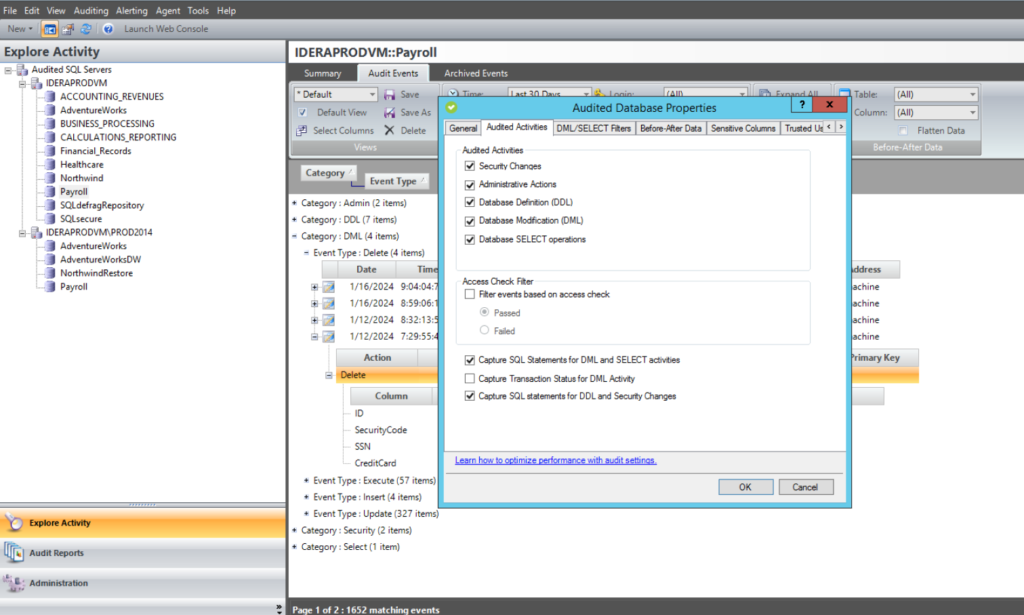
Server-level events are usually covered. What gets missed is database-level activity, particularly SELECT statements against tables in the cardholder data environment. If your auditing captures logins and DDL but not DML against sensitive tables, you’re not meeting Requirement 10. SQL Compliance Manager captures DML at the object level, including SELECT operations on specific tables, without the performance overhead of SQL Server Profiler.
Privilege escalation is a common PCI compliance failure. A service account given db_owner during a deployment three years ago and never scoped back down is a Requirement 7 violation waiting to be documented.
SOX: How Segregation of Duties Applies to SQL Server Databases
SOX Section 404 requires management to establish and assess internal controls for financial reporting. Auditors applying PCAOB and COSO standards interpret that to include two database-level controls: a complete, field-level modification history for any table feeding financial reports (who changed what, before and after values), and proof that users who create financial records can’t also modify or delete them unchecked.
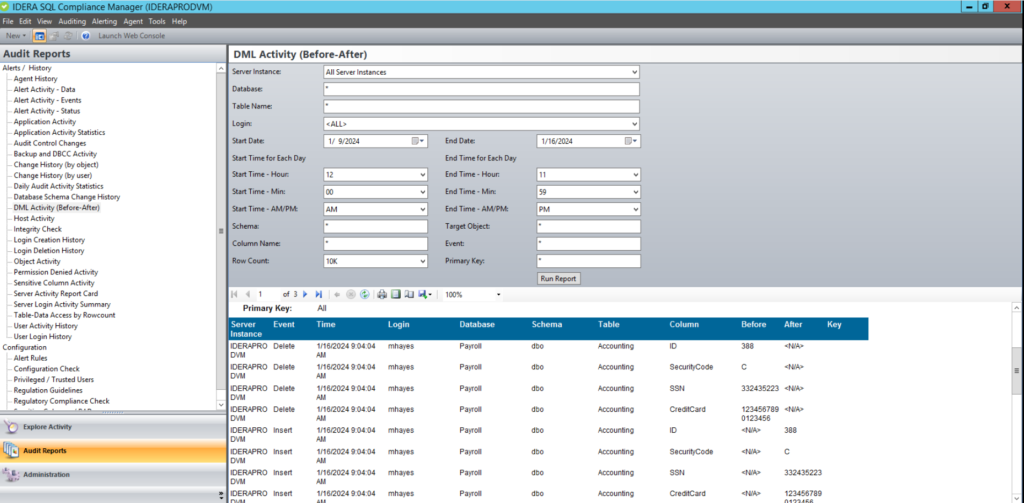
Application service accounts frequently hold permissions broad enough to bypass segregation-of-duties controls at the application layer. Showing that your application enforces approval workflows means less if the underlying service account can write directly to the financial table with no logging. SQL Compliance Manager captures field-level before-and-after values for changes to financial reporting tables, giving auditors the modification history SOX requires.
GDPR: Why Most SQL Server Environments Fail the Data Inventory Requirement
GDPR Articles 25 and 32 require that personal data be protected with appropriate technical controls regardless of where it is hosted. Article 25 mandates data protection by design and default; Article 32 requires technical measures for confidentiality, integrity, and availability. For SQL Server environments, both point to the same gap: access controls scoped to the specific tables and columns containing personal data.
That’s where most GDPR programs fall apart. You can’t scope access controls or audit logging to personal data you haven’t located. Most organizations don’t have that mapped until a breach investigation or subject access request forces the question.
FERPA: Where Student Record Access Controls Break Down in SQL Server
FERPA prohibits federally funded educational institutions from releasing student education records without consent. In practice, that standard is enforced at the application layer but rarely at the database layer. The common violation: a report that needs enrollment counts pulls full student record datasets because nobody scoped the query or the underlying view correctly. Object-level auditing on student record tables surfaces this quickly, but most institutions aren’t running it until an audit forces the question.
5 Database Security Controls Auditors Check First
How Permission Debt Creates Compliance Exposure in SQL Server
Permission debt accumulates quietly:
A database role granted during a project stays in place after the project ends.
A service account gets sysadmin during a migration because scoping it correctly would have taken an extra day.
An ad hoc login created to troubleshoot a production issue never gets removed.
Three years later, nobody involved remembers any of it, and a quarterly access review didn’t catch it because nobody defined what “baseline” looked like.
A current-state snapshot you can produce on demand
A diff between the two that documents what changed, when, and whether it was authorized
Without all three, you can demonstrate a point-in-time permission state but you can’t demonstrate control.
TDE vs. Always Encrypted: Which Satisfies Which Compliance Requirement
Transparent Data Encryption (TDE) and Always Encrypted serve different threat models, and auditors have started asking which one you’re using and why:
TDE encrypts data and log files on disk, protecting against physical media access. It does not protect against a privileged database user querying sensitive data directly.
Always Encrypted operates at the column level, with encryption and decryption handled client-side. Even a DBA with full database access can’t read the plaintext values without the column master key.
Depending on your regulatory framework, one or both are appropriate. Conflating them in your compliance documentation will get flagged.
TLS for SQL Server connections should be required, not optional. The gap is typically older JDBC/ODBC drivers that haven’t been updated to enforce encrypted connections. Available but not enforced means nothing to an auditor.
Why SQL Server Audit Logs Fail Integrity Requirements
PCI DSS Requirement 10.5 is explicit: audit logs must be protected from destruction and unauthorized modification. The same expectation runs through HIPAA and SOX.
Standard SQL Server Audit and Extended Events write to files or tables that a DBA can modify or delete. For any framework requiring demonstrable log integrity, that’s a structural problem. The audit repository needs to be logically separate from the audited environment, with access controls that prevent audited principals from touching their own records. This is the core problem SQL Compliance Manager’s architecture addresses: audit data stored in a repository the audited environment cannot reach.
Retention timelines vary by framework. Your retention policy should reflect the most stringent applicable requirement for each database’s data classification, not a single organization-wide default.
Framework
Minimum retention
Accessibility
Notes
PCI DSS
1 year
Most recent 3 months immediately available
Requirement 10.7
HIPAA
6 years
Available for review on request
Applies to all security documentation
SOX
7 years (common practice)
Producible for auditor review
Not specified for database logs; aligned with financial record retention
GDPR
Not specified
Must be available for DPA investigations
Retention must be justified and proportionate
FERPA
3 years (audit records)
Available for federal review
Record of access disclosures must be maintained with the education record
Which Database Alerts Actually Matter for Compliance Monitoring
Quarterly log reviews catch historical evidence of problems, not active incidents. But a high-volume alert stream that fires on routine activity trains teams to ignore it. The alerts worth configuring target genuinely anomalous behavior:
Logins from IP ranges outside your approved network
Service accounts touching tables they’ve never accessed before
Bulk SELECT operations on sensitive tables outside business hours
SQL Compliance Manager’s real-time alerting fires on these patterns automatically, closing the gap between quarterly log reviews and active incident detection.
SQL Server Configuration Vulnerabilities Auditors Flag Most Often
Unpatched SQL Server instances are direct compliance exposure. PCI DSS Requirement 6 and HIPAA both require protection against known vulnerabilities. Neither accepts “we planned to patch it” as a control.
SQL Server configuration vulnerabilities are often the more pressing finding. These show up in audit findings without requiring any active exploitation:
Guest account access still enabled
Weak or missing password policies
Enabled xp_cmdshell
Overly permissive CLR settings
These are configuration gaps that accumulate over time. A vulnerability assessment that covers SQL Server configuration specifically, not just OS patching, is what satisfies auditors.
EMEA Compliance: How GDPR, NIS2, and National Laws Layer for SQL Server DBAs
When the ICO or Germany’s BSI investigates a breach, they ask for access logs and permission records. Policy documentation alone no longer satisfies them. SQL Compliance Manager’s pre-built GDPR regulatory template maps directly to the audit evidence European regulators expect.
The General Data Protection Regulation (GDPR) is the baseline for any SQL Server environment holding EU citizen data. Post-Brexit, UK GDPR mirrors the EU regulation with minor divergences.
NIS2, which EU member states were required to transpose into national law by October 2024, extends mandatory cybersecurity requirements to a wider set of sectors than its predecessor. For DBAs in NIS2-covered organizations, the regulation adds incident reporting obligations (early warning within 24 hours), supply chain security requirements, and technical risk management controls beyond what GDPR requires. GDPR compliance alone doesn’t satisfy NIS2.
How SQL Compliance Manager Keeps Your SQL Server Estate Audit-Ready
Manual compliance processes degrade between audits. A large SQL Server estate requires tooling built for ongoing operational coverage.
SQL Compliance Manager: Granular Audit Logging Without Performance Overhead
Most teams narrow their audit scope in production because trace-based methods carry real overhead.
SQL Compliance Manager captures granular audit data using lightweight extended events collection, covering the events, objects, and users each framework requires without the performance hit that pushes teams to narrow their scope.
Pre-built regulatory templates for PCI DSS, HIPAA, GDPR, SOX, FERPA, NERC, CIS, and DISA STIG translate regulatory requirements into SQL Server audit specifications. The templates get you to a defensible audit posture in minutes and apply consistently across instances.
Audit data writes to a tamper-proof repository the audited servers can’t modify, satisfying HIPAA’s integrity expectation and PCI DSS Requirement 10.5. Real-time alerting on privilege escalations, untrusted application logins, and anomalous data access closes the gap between log review and active response.
SQL Secure: Permission state, baseline comparison, and drift detection
SQL Secure snapshots security access rights across your SQL Server estate and diffs them against a designated baseline. For SOX segregation-of-duties and PCI DSS Requirement 7, that baseline comparison is the evidence auditors want: not just current permissions, but whether they’ve drifted from what was approved.
Built-in vulnerability checks flag the configuration exposures that show up repeatedly in audit findings: guest account access, password policy gaps, enabled xp_cmdshell, and permissive CLR settings.
SQL Safe Backup: Encryption and chain-of-custody documentation
TDE encrypts database files but doesn’t automatically encrypt backups. That depends on configuration, and the gap is common. SQL Safe Backup applies encryption and compression to backup data, closing the exposure that exists when backup files leave the controlled production environment.
SQL Safe Backup’s access logging documents that backup files were not accessed or modified between creation and recovery.
Why Configured Compliance Controls Still Fail Audits
Audit logging fills its allocated storage and starts silently truncating. Controls configured correctly once and never validated again are harder to spot than missing controls:
Teams defer permission reviews when other priorities compete
Backup encryption enforced in production was never applied to dev environments running production data
These don’t look like gaps until an auditor pulls on them.
Teams that perform well in audits maintain audit-ready visibility year-round. SQL Compliance Manager is built for that model, with SQL Secure and SQL Safe Backup covering the permission and backup layers. The audit trail is either current or it isn’t. By the time you’re scrambling to reconstruct it, you’ve already lost the argument.