SQL Server MCP: What DBAs Must Verify Before Agents Connect
Sooner or later, someone will ask to connect an AI agent to your production SQL Server. The agent can only reach the database through a SQL Server MCP server, and that server is only as safe as the login behind it. This guide explains how SQL Server MCP works, where the risks are, and the five checks to run before you approve the connection.
What is a SQL Server MCP server?
A SQL Server MCP server exposes selected tables, views, and stored procedures as tools an AI agent can call through the Model Context Protocol (MCP). What the agent can read or change still depends on the logins and permissions already in place. Its activity is recorded only if logging has been set up to capture it. As more companies invest in agentic AI, every DBA will face the decision of whether to grant agents access to production.
How a SQL Server MCP server connects AI agents to the database
The Model Context Protocol is an open standard that Anthropic introduced in late 2024. It lets AI agents discover and call external tools through a structured interface.
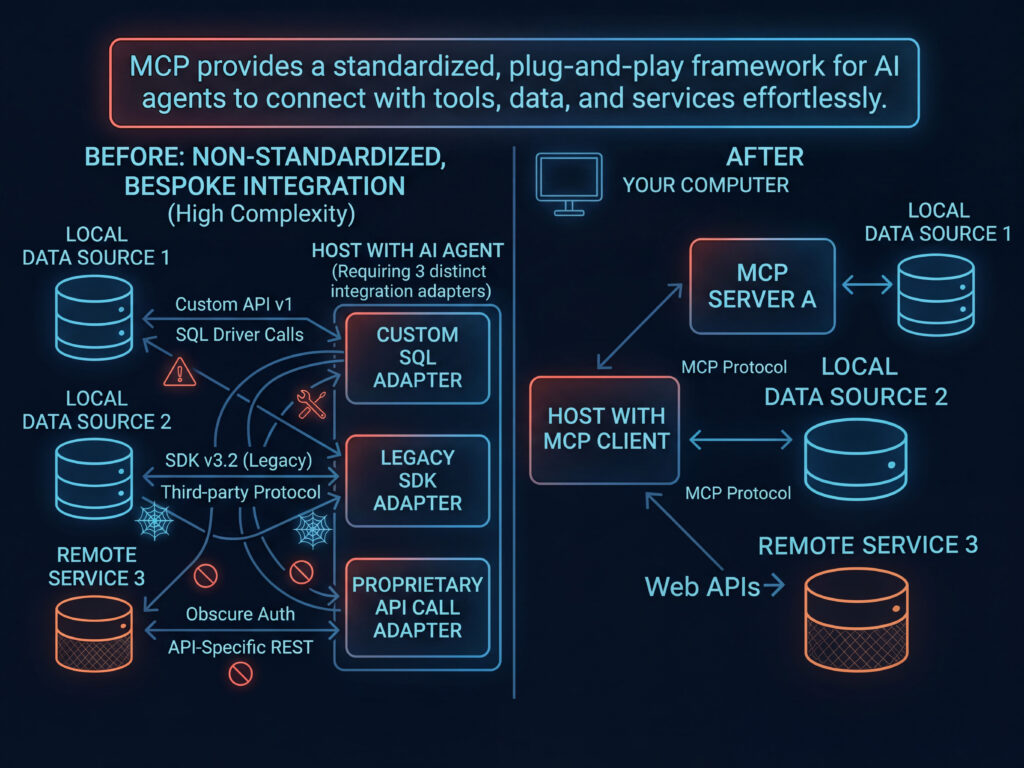
According to the MCP architecture documentation, MCP has three participants:
- Host. The AI application the user works in, such as Claude Desktop or a code editor running GitHub Copilot.
- Client. The connector the host runs for each MCP server it connects to. The host runs one client per server.
- Server. The program that provides tools to the client. Each tool has defined inputs and outputs.
The MCP specification defines how clients and servers exchange those messages.
In that setup, the SQL Server MCP server connects the agent to the database. It exposes specific tables, views, or stored procedures to the agent as callable tools, which are the agent’s only way to access the database. The connection string stays in the server’s configuration. When the agent needs data, it sends a request to a named tool; the server executes the operation against SQL Server using its own configured credentials and returns the result to the agent.
Microsoft documents its own implementation in its SQL MCP Server documentation, and community projects on GitHub follow the same basic pattern, though many leave permission scoping to the SQL login.
Why governed SQL MCP servers avoid natural-language-to-SQL
A governed SQL MCP server gives each agent a fixed set of operations based on its role. It doesn’t let the model write its own T-SQL from a prompt, an approach known as natural-language-to-SQL (NL2SQL). Microsoft explains why in its SQL MCP Server overview: “models aren’t deterministic, and complex queries are the most likely to produce subtle errors.” If the model gets a join slightly wrong, the query can return plausible numbers that nobody questions.
Microsoft’s server is part of Data API Builder, and it keeps the agent away from the raw database. The developer lists each table, view, and stored procedure the agent may use in a configuration file, and assigns each role the operations it can perform on them. The server reuses the same role-based access control (RBAC) and telemetry that govern the Data API builder’s REST and GraphQL endpoints, so the same access rules apply whether a request arrives through MCP, REST, or GraphQL.
Even in this design, a person writes the role configuration and needs an accurate picture of the database to get it right.
Why SQL Server MCP access is a DBA decision
Agent access to production SQL Server is a DBA decision because the DBA owns the credentials, permissions, and audit evidence that determine what an agent can do.
In its research on MCP security risks, Checkmarx catalogs 11 emerging risk categories across the host, client, and server layers and observes that “every new connection between an AI assistant and an MCP server expands the trust boundary.” Prompts, tokens, configurations, and tool schemas each become potential entry points.
In its MCP security explainer, Red Hat adds that remote MCP servers run on infrastructure the user does not control. Many risks associated with local code execution don’t apply, but they still pose risks because they can access users’ data.
The open-source MSSQL On-Premises MCP Server is a working example of that risk on a live instance. It connects assistants such as GitHub Copilot and Claude Desktop to a named SQL Server database using SQL authentication. Its configuration includes a READONLY flag; setting it to false enables write access. The README contains no mention of an audit log or a permission-scoping layer beyond what the SQL login already holds.
In a setup like this, the SQL login’s permissions are the only control on what the agent can do.
How to scope the login and authentication behind a SQL Server MCP server
The credential an MCP server uses sets the upper limit on what an agent can access. If a server that runs whatever queries the agent sends connects with a login holding db_owner, the agent can do anything db_owner can do in that database. Community servers such as mssql_mcp_server take connection details as configuration values, and whatever login the user supplies there becomes the agent’s identity on the instance.
SQL Server MCP servers generally authenticate with one of three methods, depending on the implementation and where the instance runs:
- Method 1:
SQL Server authentication, using a SQL login and password stored in the server’s configuration
- Method 2:
Windows authentication, using the identity of the account running the MCP server
- Method 3:
- Microsoft Entra ID (formerly Azure Active Directory), common for Azure SQL Database and Azure SQL Managed Instance
Microsoft’s SQL MCP Server adds a second layer on top of the database connection by applying the Data API builder’s role configuration, so each agent role can access only the objects and operations that the configuration grants it. Whatever the implementation, scoping starts with the login. Give each MCP integration its own dedicated login, grant it access to the specific objects it needs, keep it read-only unless a documented use case requires write access, and never reuse an application account or a person’s credentials for an agent.
What happens when SQL Server MCP prerequisites are missing
When prerequisites are missing, an agent can connect with an unreviewed credential and access tables that no one inventoried. It also leaves no record for a security team to check later.
A developer installs a community MCP server so an assistant can answer questions about sales data. To save time, the developer reuses an existing SQL login and turns off read-only mode so the assistant can fix a few records. The agent can now change data and has whatever permissions the old login had.
On a server like the on-premises project on GitHub, nothing in that setup adds scoping or logging beyond the login itself.
Suppose that login belongs to an old application and holds db_owner on a database that also contains HR tables. The agent can now read and modify those tables, and the DBA may not know the connection exists.
Months later, the security team asks what the assistant accessed and whether it changed anything. If nobody enabled logging for that login or recorded the agent’s calls, the team has no trail to check. Red Hat’s point about data access applies here as well, because wherever the MCP server runs, it reaches the data through that login.
How to get started with SQL Server MCP safely
Trustworthy agent access to SQL Server requires three things before anyone configures the MCP server. The DBA needs an inventory of every instance the agent can reach, visibility into the schema and objects on each instance, and an audit of the permissions held by the credential the server will use. Configuring the MCP server comes last, because its role and permission settings depend on the information the DBA gathers in those earlier steps.
Before an agent connects to the production SQL Server, the DBA follows these steps in order.
- Step 1: Inventory every SQL Server instance on the networks the MCP server can reach.
- Step 2: Review the schema, objects, and workload on each instance the agent will use.
- Step 3: Audit the permissions of the login the MCP server will use to connect, as well as every other account that already has access to the same data.
- Step 4: Create or narrow a dedicated login, then configure the server’s tools, roles, and read-only settings to match the review’s findings.
- Step 5: Connect the agent and keep monitoring the instance and its permissions while the integration runs.
Inventory every SQL Server instance the MCP server can reach
A DBA can’t govern agent access to an instance they don’t know exists. Most of those instances start small: a developer installs SQL Server Express for a proof of concept, or someone restores a production backup onto a test server. Others are legacy servers that kept running after the team retired the application they supported.
If an MCP server can reach one of those instances and has a valid login, the agent can read data no DBA has reviewed. Restored test copies pose the biggest risk because they contain real production data, and teams usually protect them less carefully than production environments.
SQL Inventory Manager is IDERA’s discovery and inventory tool. It scans domains and IP ranges to locate SQL Server instances within an environment. Running discovery before approving an MCP connection gives the DBA a complete list, so the DBA can specify the exact instances an agent may use during approval.
Review the schema and workload on each instance
Before approving access, the DBA needs to know which tables, views, and stored procedures an MCP server would expose from each instance. Read access to a reporting view poses less risk than permission to run a stored procedure that updates customer records. If the DBA grants the server’s login read access to every table in a database that also contains payroll data, the agent can read the payroll data as well.
SQL Diagnostic Manager gives DBAs visibility across all instances from a single console. DBAs use its query analysis to identify problematic queries and its historical analysis to track trends over time. It covers on-premises and virtualized SQL Server, as well as Azure SQL Database, Azure SQL Managed Instance, Amazon RDS for SQL Server, and GCP. With that baseline in place before the agent connects, the DBA knows what normal activity looks like on each instance, so the DBA can spot new query patterns or load introduced by the agent.
Audit the effective permissions of the MCP login
For the third prerequisite, the DBA audits two things:
- The first is what the MCP server’s credential can read, change, or delete.
- The second is who else already holds access to the same data.
SQL Server permissions accumulate through server roles, database roles, schema grants, object grants, and ownership chains. A login’s effective access can therefore be broader than the grants a DBA remembers adding.
SQL Secure performs permission analysis that shows who has access to what. It also scans for vulnerabilities and misconfigurations, checks configurations against built-in security policy templates, and produces risk reports with a visual security scorecard.
For MCP approval, the DBA and the security lead can review that output together. It shows the effective permissions of the proposed login, the excess rights to remove before connection, and the existing accounts that share access to the same objects.
Monitor each instance after the agent connects How to monitor SQL Server MCP access after the agent connects
The DBA has to recheck the approval after the first connection, because every new agent, tool, or login changes the scope of the original approval. That means tracking each instance’s behavior and permissions throughout the integration.
SQL Diagnostic Manager tracks behavior. Its real-time monitoring and customizable alert thresholds flag blocking, deadlocks, wait statistics, and unusual query load when agent traffic changes. Its historical analysis shows the trend since the integration went live. Query analysis identifies the problematic queries behind a shift, so the DBA can separate agent workload from the application workload the team sized the instance for.
On the permissions side, the DBA reruns SQL Secure’s permission analysis and risk reports after each new integration and on a regular schedule. The reports show whether the MCP login has gained rights, whether new accounts share access to the same objects, and whether configuration has drifted from the team’s security policy. When the DBA compares each report with the approved one, the security lead gets a documented record of access changes.
Where IDERA fits alongside any SQL Server MCP server
DBAs can run IDERA’s SQL Diagnostic Manager and SQL Secure alongside any MCP implementation their team adopts, including Microsoft’s SQL MCP Server and community projects on GitHub. IDERA doesn’t build its own MCP server. The company treats MCP as one more way to connect to SQL Server, and that connection is only as secure as what the DBA can already see and audit.
Some database tooling vendors now market their own MCP servers as the governance layer for AI-driven schema changes. Those products control what an agent can deploy. They send every schema change the agent writes through version control and policy checks before it reaches production.
Before any agent connects, the DBA still has to answer a different set of questions. Which instances exist? Who and what can already reach them? Would anyone notice if people or agents started using them differently? A team that uses one of those vendor MCP servers for schema changes still needs those answers, and IDERA’s database monitoring solutions provide that visibility.
Build the governance case before an agent connects
A SQL Server MCP integration is only as trustworthy as the checks the DBA completed before it connected. The MCP server’s configuration defines how the agent reaches the database, and whether that path is safe depends on the inventory, visibility, and permission audit the DBA completed first.
SQL Diagnostic Manager gives DBAs monitoring and workload visibility across SQL Server, Azure SQL, and Amazon RDS instances. SQL Secure shows who has access to what and documents the risk before the DBA approves a login. Together, they give the security lead evidence to review, no matter which MCP server the team chooses.
To build that visibility on your own instances, start with a 14-day free trial of SQL Diagnostic Manager.
Frequently asked questions about SQL Server MCP
What tools does a SQL Server MCP server expose to an AI agent?
A SQL MCP server exposes whatever its configuration defines, usually read and write operations on specific tables, views, and stored procedures. Microsoft’s SQL MCP Server offers a small set of tools for working with tables, views, and stored procedures in its configuration. Agents can list what is available, read, create, update, and delete records, and run stored procedures; the agent’s role controls each. Some community servers expose a general query tool, which leaves all scoping to the connecting login.
Does a local or remote MCP server change the risk for SQL Server?
It changes which machine holds the credential, and both setups carry risk. A local server usually runs on the user’s machine over stdio transport, meaning the AI application starts the server as a local process. That server uses credentials stored on the machine, so exposure depends on how secure the workstation is and who uses it. A remote server centralizes credentials and configuration in one place the DBA can review, but Red Hat notes it still carries risk because it can access the data. Either way, the login’s permissions determine what the agent can reach.
Can a SQL Server MCP server write to the database?
It can, if the configuration and login allow it. For example, the MSSQL On-Premises MCP Server has a READONLY flag; setting it to false enables write access. Keep each MCP login read-only unless a documented use case requires write access, and grant it access only to the specific objects it needs.
Does a SQL Server MCP server log what the agent does?
Not automatically. A SQL Server MCP server leaves a record only if logging has been set up to capture it. If nobody enables logging for the MCP login or records the agent’s calls, the security team has no trail to check later. Set up auditing for the dedicated MCP login before the agent connects.
What authentication methods does a SQL Server MCP server support?
Most support SQL Server authentication, Windows authentication, Microsoft Entra ID (formerly Azure Active Directory), or a subset of these, depending on the implementation and whether the instance runs on-premises or in Azure. Community servers typically use a SQL login or Windows credentials for configuration. Whatever the method, give each MCP integration its own identity so the DBA can review its permissions and activity separately.
Does SQL Server data sent through MCP leave the network for a third-party LLM?
It can. The MCP server may run inside the network, but the AI application passes the query results to the model. If an outside provider hosts that model, those results go to the provider. The author of the SQL Server blog sqlfingers made the same point in a March 2026 post. Treat every column an agent can read as data that may leave the network, and scope the credential accordingly.