















SQL Server Performance: Tuning Methods that Acutally Work

Categories
- Free tools
- SQL Compliance Manager
- SQL Defrag Manager
- SQL Diagnostic Manager for MySQL
- SQL Diagnostic Manager for SQL Server
- SQL Diagnostic Manager Pro
- SQL Inventory Manager
- SQL Query Tuner for SQL Server
- SQL Safe Backup
- SQL Secure
- SQL Workload Analysis for SQL Server
- Uptime Infrastructure Monitor Formerly Uptime

ER/Studio Repository Setup & Ports – Part 1: SQL Server
Howdy! In this latest blog post, I will be covering the Database setup one would need for our IDERA ER/Studio Repository. Pre-requisites: SQL Server 2012-2016 (Standard and Above) SQL Server Configuration Manager Enable TCP Ports The default port is 1433. You...
Registering Default PowerShell Repository
Using PowerShellGet to Install Scripts and Modules If you use the PowerShellGet module (which ships by default on Windows 10 and Server 2016), you can easily download and install shared PowerShell scripts and modules: PS> Find-Module -Tag Security Version Name...
Logical to Physical Data Modeling
In the last article we learned how to create a data model from scratch using ER/Studio Data Architect. In part II we will explore about how to convert a Logical Data Model into a Physical Data Model. See also: IDERA's Guide to the Three Types of Data Model:...
Running PowerShell Script as a Scheduled Task
Scheduling PowerShell Scripts for Automatic Execution If you need to run a PowerShell script in regular intervals, why not run it as a scheduled task? Here are some lines that help you create a new scheduled task to run a PowerShell script at 6AM: #requires -Modules...

Getting the Most from Your Software Vendor
This topic is relevant to more than just Idera and it comes from experience working for and with multiple software vendors in multiple industries. The simple realization is that certain customers seem to know how to gain advantages beyond the purchases and...
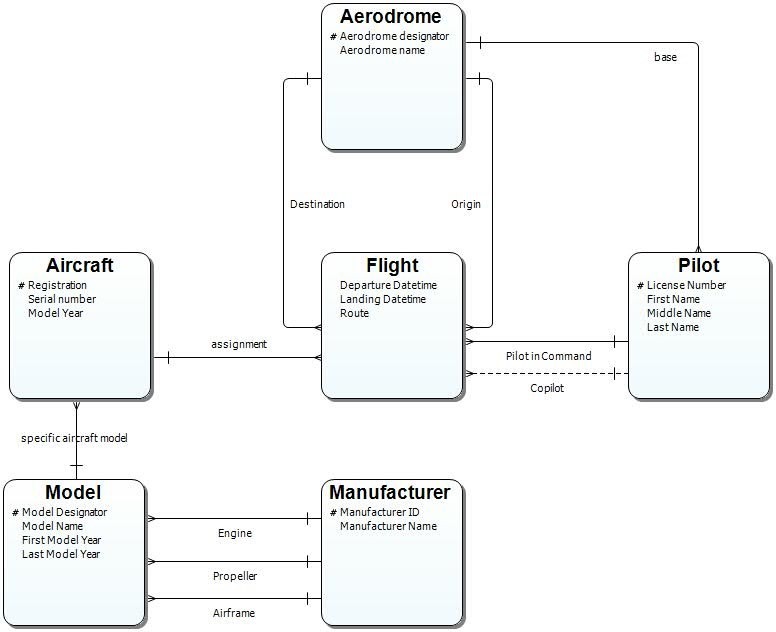
Modeling Graph Data Stores in ER/Studio
Modeling Background Enterprise data environments have become increasingly complex due to a proliferation of different technologies and data platforms. A given organization may have hundreds of different data stores including multiple relational database...
Creating Random MAC Addresses
Randomly Generated MAC addresses If you just need a bunch of randomly generated MAC addresses, and you don’t care much about whether these addresses are actually valid, then here is a one liner: PS> (0..5 | ForEach-Object { '{0:x}{1:x}' -f (Get-Random -Minimum 0...
Converting Binary String to Integer
Convert a binary text string into integer Here is how you convert a binary text string into the corresponding integer value: $binary = "110110110" $int = [Convert]::ToInt32($binary,2) $int Going the other way is even easier: PS> [Convert]::ToString(438,2) 110110110...
Turning AD User into a Hash Table
Sometimes it could be useful to load all attributes from a given AD user into a hash table. This way, you could edit them, and then use Set-ADUser with its -Add or -Replace parameters to apply them to another user account. AD User attributes Here is how you read in...
How to run an application under an account of a different domain
Running Applications as a Different User Outside the Domain Not too long ago, I came across a scenario where a user needed to launch an application (e.g. SQL Server Management Studio) to access SQL Server, not such an unusual scenario. The catch was that the user was...
Exporting ActiveDirectory Module
To manage users and computers in your Active Directory from PowerShell, you need the ActiveDirectory module which comes as part of the free RSAT tools from Microsoft. Using Implicit Remoting for ActiveDirectory Module Provided you are domain administrator and have...
Determine if Array Contains Value – Using Wildcards
Checking for an Element in an Array Using PowerShell If you’d like to know whether an array contains a given element, PowerShell provides the –contains operator. This operator does not support wildcards, though, so you only can check for exact matches. Using a...
Working with LDAP and Dates
LDAP filters LDAP filters are a fast and powerful way of retrieving information from Active Directory. However, LDAP filters use a very low-level date and time format. It is basically a huge integer number. Fortunately, PowerShell contains ways of converting real...
Show or Hide Windows
PowerShell can call internal Windows API functions, and in this example, we’d like to show how you can change the show state of an application window. You’ll be able to maximize, minimize, hide, or show, for example. Using PowerShell 5’s Enum Capability for Show State...
Using Named Parameters in PowerShell Functions
When you create a PowerShell function, all parameters are positional until you start adding the “Position” attribute. Once you start to do this, all parameters with no “Position” are suddenly named and must be specified. Have a look: Example of a Classic Function...
Modern Replacement for systeminfo.exe
Retrieving System Profiling Information with systeminfo.exe For ages, systeminfo.exe returned all profiling information for a computer, and could made object-oriented in Powershell – somewhat: PS C:\> $info = systeminfo.exe /FO CSV | ConvertFrom-Csv PS C:\>...
HOW TO – Monitor MS-SQL Clusters and Always-On Availability Groups
Problem: Monitoring a traditional Microsoft SQL Server cluster, one that typically has 1 active and 1 passive node, is a challenge because at any point the services, storage, and SQL Server’s engine can be running on either (or any!) node at any time. Typically...
PowerShell Remoting and HTTP 403 Error
Resolving "HTTP 403" Errors in PowerShell Remoting If you use PowerShell remoting and get “HTTP 403” errors, one of the more obscure reasons for this is a proxy that interferes with your request. Excluding the Proxy to Fix the Issue It’s easy to exclude the proxy,...
SQL DM & ServiceNow Email Integration
Using Email Action Responses in SQL DM to Integrate with ServiceNow This document describes the procedure of using email action responses in SQL DM to provide information to ServiceNow via its email receiver and parsing functionality to appropriately set field values...
Replacing Special Chars like “Umlauts”
PowerShell 2+ Sometimes it becomes necessary to replace special characters like German “Umlauts” in order to normalize user names or email addresses. Here is a little function that illustrates how this can be done: #requires -Version 3 function...