Free Tool – Powershell Plus
Manage PowerShell scripts in an integrated development environment
Integrated Development Environment (IDE) for PowerShell
Additionally, an IDE simplifies the deployment and versioning of PowerShell scripts, ensuring that best practices and proper code management are followed. By providing robust debugging, profiling, and tracing tools, an IDE enables developers to efficiently locate and rectify issues and optimize script performance. Overall, an IDE plays an essential role in allowing administrators and developers to create, maintain and execute PowerShell scripts effectively and effortlessly.
Download the free tool PowerShell Plus now!
The free tool PowerShell Plus provides an advanced interactive development environment for automating and optimizing tasks with Microsoft PowerShell scripts, supporting quick learning for beginners, and increasing the productivity for expert users. It helps you to:
Learn PowerShell fast via its interactive learning center.
Improve productivity via its intuitive user interface with many productivity features.
Simplify executing PowerShell commands with its interactive console and advanced script editor.
Manage and automate repetitive tasks when creating, editing, and executing scripts.
Tech Specs
Desktop Console
- Microsoft Windows: Server 2008, Server 2008 R2, 7, Server 2012, 8, Server 2012R2, 8.1; plus Server 2012 R2 Update, 10, Server 2016, Server 2019, 11, Server 2022 (provisional); 64-bit, 32-bit
- Microsoft PowerShell: 3.0 or later
- Microsoft .NET Framework: 4.0 or later
Learn PowerShell Quickly from the Interactive Learning Center
Experience PowerShell by example. Short tutorials guide you through basic concepts at your own pace. The comprehensive learning center also includes dynamically created help topics from currently installed PowerShell CmdLets, Snap-Ins, Modules, Providers and WMI objects.
Execute PowerShell Fast and Accurately Using the Powerful IDE
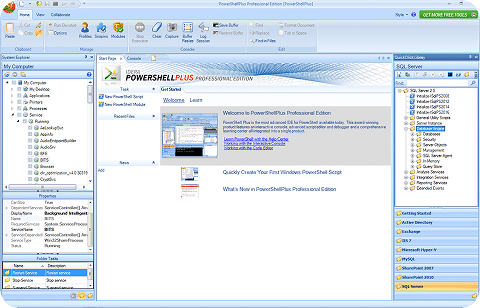
The Console allows you to work interactively with PowerShell from a feature rich Windows UI. The Start page offers easy access to tasks, recent files and Getting Started topics. Plus, many productivity tools including System Explorer, Variables Monitor, Code Snippets, Command History, Remoting and many others.
Access Hundreds of Pre-loaded Scripts from the QuickClick Library
Access hundreds of pre-loaded scripts for SQL Server, SharePoint, Active Directory and Exchange from the QuickClick™ Library. The tree structure organization lets you easily execute scripts in the Interactive Console, edit in the Code Editor and publish as self-contained XML documents that can be shared with colleagues and friends.
Use the Script Editor to Code and Debug PowerShell Faster
The advanced debugger and script editor lets you build and test complex PowerShell scripts, try one line PowerShell commands from an embedded console, and sign your script with a security certificate all from a single workspace. Editor and encoding features include: code folding, bookmarks, breakpoints, formatting, find and replace, and much more.
Download Community Scripts
Search and download thousands of community scripts from PoshCode and Tech Net script center libraries – directly from the PowerShell Plus console and editor. Plus, publish and share scripts you have created to any network share.