















SQL Server Agent
SQL Enterprise Job Manager

SQL Job Monitoring
Monitor and Manage Jobs Across Database Environments
Managing agent jobs for SQL Server across multiple servers and instances is difficult without the right tools. Failing jobs that do not complete on time can slow performance, cause added down time, and result in data loss. SQL Enterprise Job Manager monitors and manages SQL Server agent jobs and Windows tasks. The familiar calendar layout makes it easy to view status, manage details, and review history for any job or instance in your environment.
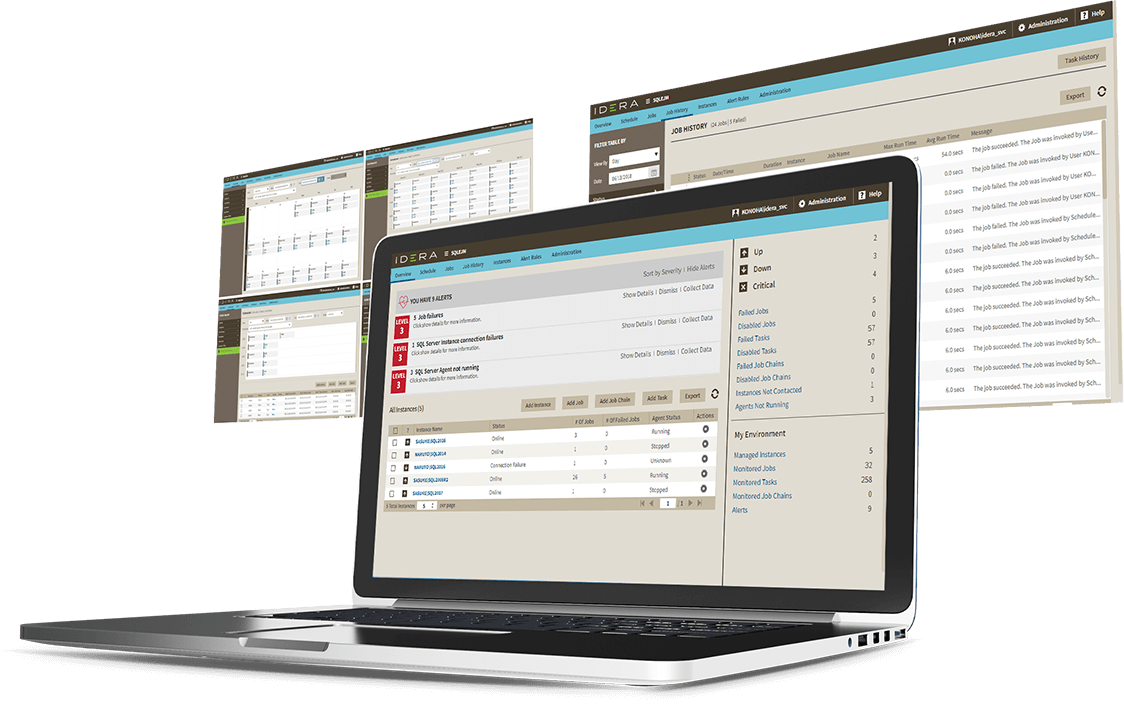
- View job status and details with familiar calendar layout.
- Chain jobs together to build automated workflows.
- Configure and manage jobs that run over multiple instances.
- Set alerts to be notified of potential issues.


-
SQL Job Monitoring Dashboard
Manage with centralized console
Manage jobs across multiple instances from a single console. Easily build, modify, or delete any job with few simple clicks.
-
SQL Maintenance
Use maintenance mode
Define maintenance windows for specified instances. Configure jobs to run only within maintenance windows, and disable jobs and alerts not to run.
-
Database Summary
Summarize jobs
View intuitive job summary with at-a-glance overview of job environment. View alert summary, and schedule of day’s jobs and their status.
-
SQL Server Job Schedule
View calendar schedule
See jobs and status in familiar calendar layout in calendar schedule. View job schedules across all instances and drill-down for more details.
-
SQL Server Reporting
Filter jobs
Use predefined and custom filters to quickly search and sort through jobs against specific parameters.
-
SQL Server Agent Job
Create and modify jobs
Create new SQL Server agent jobs or modify existing jobs on a single instance or across multiple ones. Job wizard provides step-by-step guidance through the job creation process.
-
SQL Job Monitoring
Identify Performance Issues
The server performance timeline provides overview of running jobs across instances as compared to CPU cycles being consumed to identify performance hogs.
-
SQL Job Scheduler
Schedule jobs and resolve conflicts
The job overlap view provides details on overlapping job runtimes so scheduling can be adjusted to limit conflicts
-
SQL Server Agent Performance
Analyze job trends
Analyze job execution results by day, week, month, or year to identify trends and tune performance. View trends like top failed jobs, most frequently run jobs, and longest running jobs.
-
Windows Server Agent jobs
Monitor Windows Server Agent jobs
Monitor and manage Windows Server Agent jobs alongside SQL Server jobs in a single tool to improve productivity and enable cross-platform job management.
-
SQL Job Notifications
Setup alerts and notifications
Create job alerts and set up email notifications to stay informed and on top of issues as they happen. Set custom alert thresholds to receive tailored notifications.
-
SQL Server Job History
View job history
See run history of all monitored jobs. Job history page provides overviews of each job’s status, run duration, and summary of results.
-
SQL Server Job Wizard
Copy jobs
Easily copy jobs and apply to another instance or use them as starting points for quick creation of similar jobs. All original details of jobs are loaded into the job creation wizard.
-
Enterprise SQL Agent
Scale across enterprise
SQL Enterprise Job Manager is designed to manage jobs across your entire SQL Server environment.
-
SQL Server Job Performance
Optimize performance
Customize job status collection interval by instance to optimize balance between performance and data.
-
SQL Server Web Console
Install lightweight web console
Run as a stand-alone web application without need for Microsoft Internet Information Services (IIS).
-
SQL Server Agent Monitoring
Deploy easily
Provide access via intuitive web-based user interface. Sign on and use remotely from anywhere.
-
Cloud Virtual Machines
Install on cloud virtual machines
Unify your control by running SQL Enterprise Job Manager on cloud virtual machines—such as Azure Virtual Machine (VM) and Amazon Elastic Compute Cloud (EC2).
-
SQL Server Cloud
Monitor SQL Server on cloud virtual machines
Monitor SQL Server instances running on cloud virtual machines —such as Azure VM and Amazon EC2.
-
SQL Server Hybrid Environments
Monitor hybrid environments with single tool
Save time by using the same performance-monitoring tool for SQL Server databases on-premises (on your physical and virtual machines); and in private, public, and government cloud (on virtual machines).
-
SQL Server Cloud Drives
Access mapped cloud drives
Get most out of cloud with cloud storage that is mapped as network drives or removable drives on Windows with SQL Enterprise Job Manager. For example, map storage to Amazon Simple Storage Service (S3) and Azure Blob Storage.
Let’s get started.
Start your 14-day trial, no credit card required (but all fields are required).
Commercial licenses are not supported with this trial download. To update to the latest version, please access IDERA’s customer support portal.
Already a customer and looking to upgrade?
Get the latest version here.
Start SQL Enterprise Job Manager Today

SQL Enterprise Job Manager
Datasheet
Everything you need to know, all in one downloadable PDF.

Simplify Job Monitoring
and Management
Learn how to simplify monitoring
and management of SQL
Server agent jobs

Money Management International
Keeps SQL Server in Top Form
Learn how to explore top monitored
instances, focus on problematic
occurrences, and more.

Juggling Agent Jobs in
a Complex Environment
Learn more about SQL Server
agent jobs and how to
better manage them

Manage SQL Server Agent Jobs
Across Your SQL Server Farm
K. Brian Kelley shows how to manage
the menagerie of multiple SQL
Servers and their jobs

Tips for Managing Large
Numbers of Jobs
Learn how to manage and schedule
a large numbers of SQL Server,
jobs across the enterprise