















Free Tool – Powershell Scripts
Manage SQL Server and Azure SQL Database with PowerShell scripts
PowerShell Scripts for SQL Server and Azure SQL Database
By using these scripts, administrators can standardize administrative practices across multiple servers and databases, enhancing reliability and predictability of system management. In addition, PowerShell’s integration with Azure allows for the consistent management of on-premises and cloud databases, enabling administrators to effectively administer hybrid cloud environments. Therefore, PowerShell scripts play a vital role in creating a more efficient and robust database management system.
Download the free PowerShell scripts for SQL Server now!
The free tool PowerShell Scripts for SQL Server provides helpful scripts to automate and manage various tasks and operations for Microsoft SQL Server and Microsoft Azure SQL Database. It helps you to:
Automate the management tasks for SQL Servers’ Database Engine, and its Analysis, Integration, and Reporting Services.
Reduce the learning curve, saves time, and minimizes errors by providing ready-to-run scripts for many common tasks.
Customize the tasks by providing scripts you can edit and connect to other scripts.
Run tasks on remote servers and schedule tasks via executable scripts.
The collection of PowerShell Scripts include scripts to:
Initialize PowerShell modules
Administer the Database Engine, and the Analysis, Integration, and Reporting Services
Adhere to the Center for Internet Security (CIS) Benchmarks
Manage in-memory databases
Tune the Query Store
Tech Specs
PowerShell Scripts
- Microsoft Windows: 2008, 7, Server 2008 R2, 8, Server 2012, 8.1, Server 2012 R2, 10, Server 2016, Server 2019; plus 11, Server 2022 (provisional); 64-bit, 32-bit; no support for Microsoft Windows Server’s Server Core Role
- Microsoft Windows PowerShell: 3.0, 4.0, 5.0, 7.0, .NET Core
Database Platforms
- Microsoft SQL Server: 2008, 2012, 2014, 2016, 2017, 2019; plus 2022 (provisional); Windows, Linux; Express, Standard, Enterprise editions
Databases in the Cloud
- Microsoft Azure SQL Database
What is New in PowerShell Scripts for SQL Server 7.0:
The release of PowerShell Scripts for SQL Server version 7.0 in 2024 focuses addressing numerous customers submitted suggestions by adding new scripts, refactoring scripts, and replacing deprecated scripts.
- Added new scripts:
- New scripts for the Azure Az PowerShell module (-IAz scripts) – The Az PowerShell module is a set of cmdlets for managing Azure resources directly from PowerShell. PowerShell provides powerful features for automation that can be leveraged for managing your Azure resources, for example in the context of a CI/CD pipeline.
- New script for the Database Engine that uses the SQL Management Objects (SMO) Table.CheckTable() method to test the integrity of database pages implementing store for the referenced table and indexes referenced (Start-ISqlCheckTable)
- New script for performing SQL Server security assessments
- New script for General Utility for retrieving SQL Server inventory data
- New script for Initialization for SQL Server 2019 to support new SQL Server PowerShell module
- Refactored existing scripts to work with PowerShell 7, .NET core, and SQL Server 2019
- Replaced deprecated scripts:
- Replaced deprecated Get-WmiObject cmdlet usage with new Get-CimInstance cmdlet for improved security
- Replaced deprecated Get-EventLog cmdlet with new Get-WinEvents cmdlet
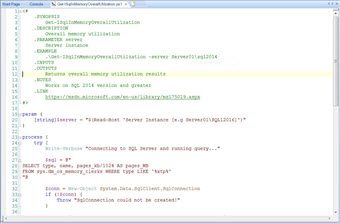
Database Engine
- Start and stop services
- Connect to an instance, and get connection information
- Manage databases, and script out databases
- Set adaptive query processing
- Manage policies and error logs
- Manage firewall rules, logins, assemblies, backups, and agent jobs
- Get extended event information
Center for Internet Security (CIS) Benchmarks
- Start and stop services
- Connect to an instance, and get connection information
- Manage databases, and script out databases
- Set adaptive query processing
- Manage policies and error logs
- Manage firewall rules, logins, assemblies, backups, and agent jobs
- Get extended event information
Azure SQL Database
- Initialize PowerShell module
- Set scaling level, and set auditing and threat detection
- Get database properties
- Get alert definitions, and set and get alert rules
- Get query results, and get query metric data
Query Store
- Enable and disable Query Store
- Get information about query plans in Query Store
- Get activity status
- Set maximum data retention size
- Set automatic tuning of queries via Query Store
General Utilities
- Get list of registered instances
- Ping instances and get their status
- Set aliases for instances
- Get advanced properties by service
- Add service account to local security privilege
- Get and set power plans
Reporting Services
- Start and stop services
- Connect to an instance, and get connection information
- Backup and restore encryption keys
- Get configuration information
- Get event log information
Integration Services
- Start and stop services
- Connect to an instance, and get connection information
- Manage packages and catalogs
- Publish projects
Analysis Services
- Connect to an instance, and get connection information
- Get a list of databases
- Backup databases, manage backup retention, and restore databases
In-memory Databases
- Get overall memory utilization
- Get size on disk
- Get detailed utilization by table
- Get checkpoint size